Table of Contents
Upon opening the ReST packager, you will notice several distinct elements of the layout. First, the packager is built on the same framework (ReST Wizard Framework) as the ReST Installer. Using the same framework allows the packager to become familiar with the Wizard Framework as well as providing a simple means of walking packagers through the complex process of creating a ReST Package. Each major section in package creation is located on an distinct panel listed on the left side of the packager. The panel that is currently selected has an arrow on the left side (left callout in Figure 2.1). Separating the sections into distinct panels allows packagers to better focus on each individual section and have a firm roadmap for package creation. Each element has an associated tooltip which describes the purpose of the entry. After the packager is open, it is possible to open both ReST Packages (.rsp) and ReST Package XML (.xml). It is important to make sure that the all of the included files listed in the package files are accessible to the packager.
Figure 2.1. Create Header
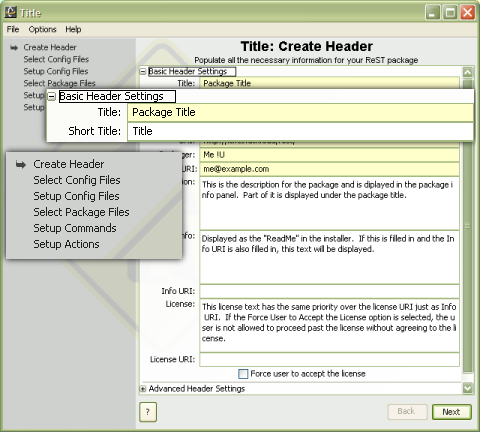
The common elements in all panels of the packager (cutout in regular size with the packager window in the background). Yellow dialogs denotes required entry and left panel list shows location and todo list of package creation.
There are several important tags in the above example.
The
titlesets the package title
that will appear in the Installer. If the title is longer than
25 characters, a second, shorter title may be set with the
roleattribute set to
short. If no short title is provided and the title is longer
than 25 characters, then in space-constrained parts of the
application the long title will be truncated at 25 characters.
The
baseelement gives a way of
grouping packages that should be installed in a similar area.
For example, packages for the LAPACK and BLAS libraries have
been written with a base of
libso that they, and other libraries, will
be easy to find and use. The
baseshould always be set to
a value that will be valid for the filesystem on all target
machines.
The contents of the
versiontag should be the
version on the software in the package and not the version of
the package itself. The version of the package can be given as
an attribute of the
packageroot element if
desired. Additional tags exist for the package header,
including options for editing configuration files, added files
to the package, and defining actions that can be performed once
the package has been installed. All of these tags are defined
with examples in a
reference sectionat the end of
this document.