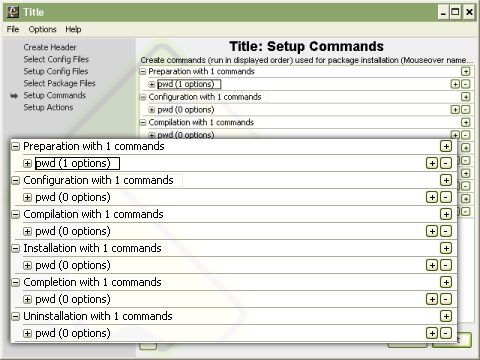
Commands in the package are broken into six steps, which simply provide a logical grouping of the commands that are run. The six steps as seen in Figure 2.6, in order, are Preparation, Configuration, Compilation, Installation, Completion, and Uninstallation, with the last grouping actually optional. Commands that need to be run first, before anything else can happen, such as extracting archives or creating directories should be placed in the preparation step. Package sources will be sent to the remote machine and package directories will be created prior to this step. Anything pertaining to configuring the software, such as running a configure script should be placed in the configuration step. Configuration files included in the package will be sent to the remote machine between these first two steps. Commands related to compiling and installing the package should be placed in the next two steps respectively. During the completion step the packager should clean up the build area however possible, such as deleting unneeded sources that remain. Lastly, if a packager would like to provide a means for automatically uninstalling their software, commands pertaining to this should be placed in the uninstallation step. Each step is essentially equal, but provides a logical way of organizing the package. Packagers are encouraged to group their commands using these logical step. Every step except the uninstallation step must be in the package XML, but may be empty if not needed.