Many software packages have configuration files that must be edited before the software can be used. To the developer of a software package writing the configuration files may be trivial, but this is often not the case for the end user. For this reason, the ReST Installer may be used to edit configuration files for the software package. The package must include a stub configuration file with a series of tokens to substitute. Each token appears with a % character on either side of the token, such as %token%. With a stub file created the packager must define the substitutions for this file in the Packager.
The configuration files are a special category of package files as stated above. The configuration (config) file tokens are substituted during transfer after all the package files are transferred and the preparation commands are completed. To add a config file to the package, browse to the files containing the tokens or type in the location and choose import. As the files are imported, they are scanned for any tokens contained and the number of tokens is displayed in the tokens column. Double clicking on a row or right clicking on it and selecting view will display the file in the viewer. If a config file needs deletion, right click on the file and select remove. The complete file path can be viewed as a tooltip by hovering the mouse cursor over the row as seen in Figure 2.2.
Figure 2.2. Select Configuration Files
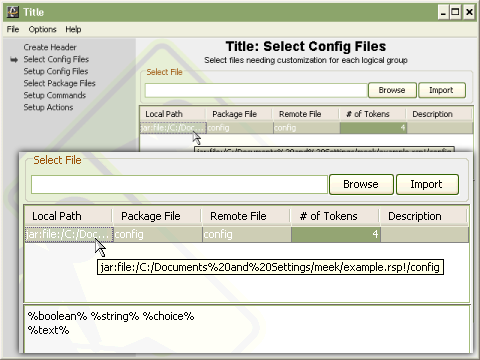
Selecting configuration files is easily done using the packager.
Once all the config files have been imported into the
Packager the Setup Config Files panel display's the config
files tokens needing to be setup. The
configfiletag has three
attributes: packagefile (the location of the stub file in the
package), remotefile (where the resulting configuration file
should be placed on the remote machine), and description (a
simple description for the user). Additional information about
the
configfileand
subtags, including
additional attributes to each, can be found in the reference
section at the end of this document. Figure 2.3 shows the
"config" config files with four tokens titled "boolean",
"string", "choice" and "text". When the Setup Config Files
panel initially loads, each config file is listed with a
collapsable section containing the tokens. The first config
file initially is expanded as show for the "config"
configuration file in Figure 2.3. Each token also has a
collapsable section under it, as show in Figure 2.4, with the
various types of substitutions that can performed. It is
important to note the names of the tokens are very important
because they are what is displayed to the user when prompting
for input.
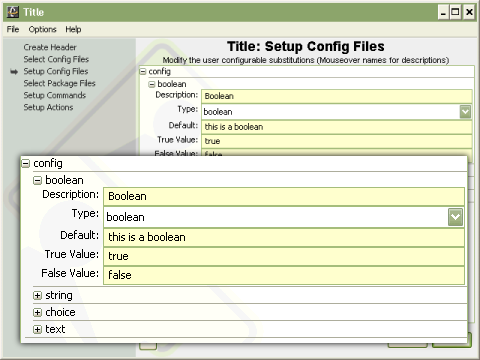
Once all the configuration files have been entered the Setup Config Files panel displays all the configuration (config) files with an associated listing of all the config files tokens. Each config file token also has a collapsable section allowing for selecting the type of substitution and setting up the token. Every token requires several common inputs, Type, Description and Default. The substitution type determines what the installer displays for input. Boolean displays a checkbox with the associated token name. String displays a single line text input box. Choice displays a drop-down box, similar to the box for Type, that can be made editable by the packager by selecting the appropriate checkbox. The choice values are input in a comma delimited list and may contain spaces. The final substitution type is text. The text area allows for substitutions to be made containing special characters such as tabs and newlines. As with all components, any field with a yellow background signifies required field for the specific substitution type.
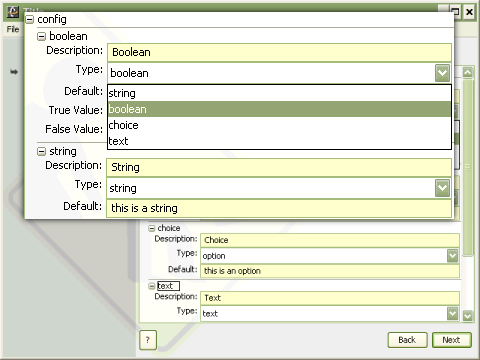
In the previous two figures (2.4 and 2.5) only four
substitutions are made ReST, however, will handle as many
substitutions as are needed. Each of the four substations
represents a type of substitution supported by ReST ,
string(no more than one line of text),
text(multiple lines of text),
choice(a defined set of choices, much like
available for command options) and boolean (a checkbox defining
if a predefined substitution should take place). Each
substitution type is useful for different types of
substitutions. For example, boolean substitutions are useful
when a single line needs to be commented or uncommented. This
could be done by the following example
Example 2.1. Boolean Substation
#Uncomment the next line to enable 3D mode %Enable 3D
      Mode%enable-opengl
The token is "Enable 3D Mode" and the most useful substitution type would be boolean. With the boolean type selected, two new fields are displayed, true value and false value. The user is displayed a checkbox when setting up the config file. If Default is set to "true" then the default substitution made is with the true value, otherwise, the false value is used for the substitution. So, if the true value is set to "" and the false value is "#", the user can change the value easily in a familiar way but clicking on a check box followed by "Enable 3D Mode".
The boolean substitution has the most complex substitution usage available in ReST. The other substitutions have less options available and are therefore less complex in their usage. The types of substitutions that are not boolean all have a default value. If no user customized value is provided then the default it substituted when the substitution takes place for all types except boolean.